An AI file organizer reads what is inside each file, gives it a clear name and puts it in the right folder. It turns a Downloads folder full of scan0042.pdf and document(3).pdf into files you can find by searching for "electricity March" or "Adobe invoice".
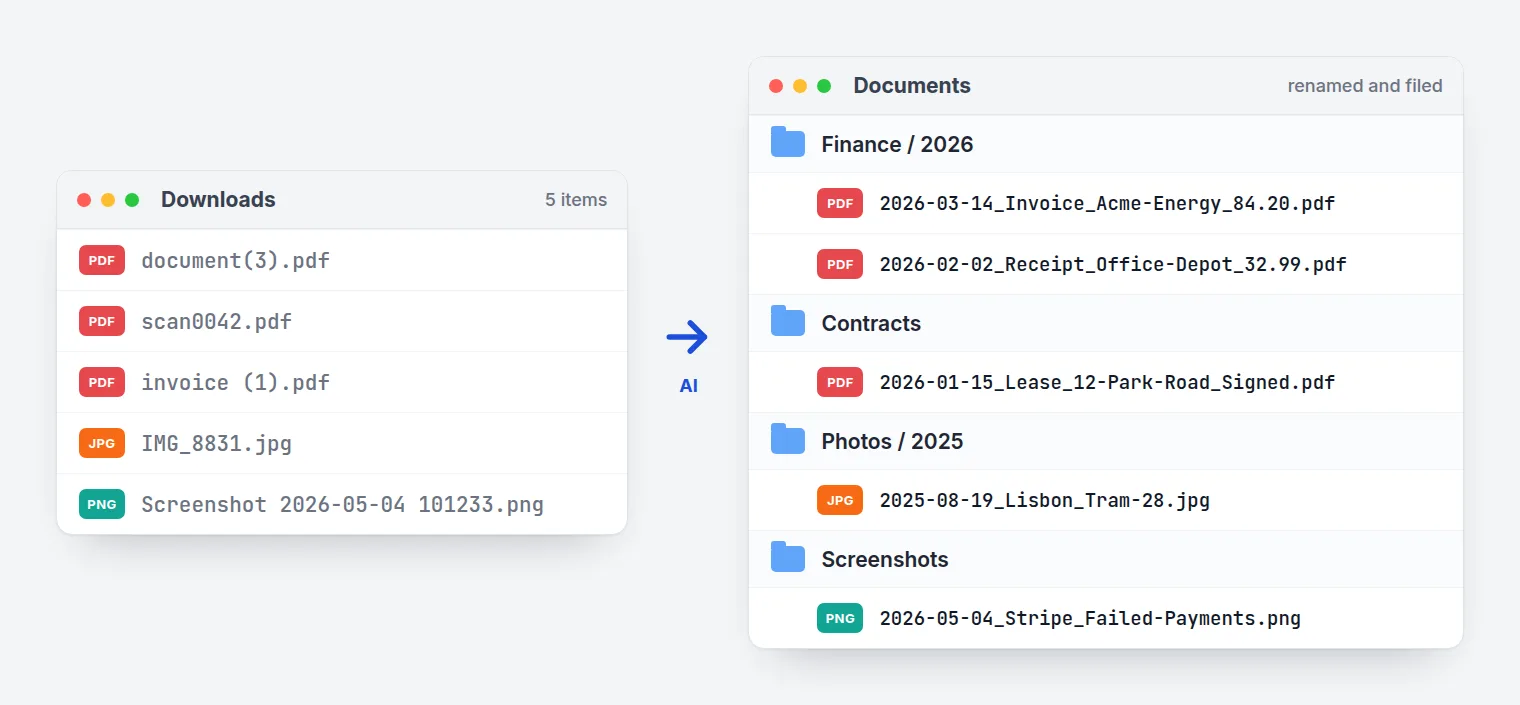
This guide explains how an AI file organizer works, how it differs from an AI file renamer and from bulk rename tools, and what to look for when you choose one. It also covers what's new in FilesDesk, our AI file organizer for Mac and Windows. We update it every month.
In short
- An AI file organizer does two jobs: it names each file from its content and files it into a folder.
- The good ones read scans and photos too, show every name before anything changes, and let you undo.
- Watch folders and email inboxes keep new files organized without you.
- For private files, pick one that can run on local AI, so nothing leaves your computer.
- New in FilesDesk this autumn: templates built from one sentence, and control from Claude and ChatGPT.
What is an AI file organizer?
An AI file organizer is an app that reads the contents of your files (text, scans, photos, audio) and uses that to rename and sort them automatically. Instead of matching on the old filename, it understands what each file is, then names it and moves it to the right folder.
AI file organizer vs AI file renamer vs bulk rename
An AI file renamer does the first half: it reads a file and writes a descriptive name. An AI file organizer also moves the file into a folder by your rules. A bulk renamer, like PowerToys PowerRename or Finder's Rename, only changes text already in the filename, so scan0042 gives it nothing to work with.
A bulk renamer can only shuffle the words already in a filename. An AI file organizer opens the file and reads it.
| Bulk renamer | AI file renamer | AI file organizer | |
|---|---|---|---|
| Reads file contents | No | Yes | Yes |
Works on Document1.docx | No | Yes | Yes |
| Moves files into folders | No | No | Yes |
| Runs on new files by itself | No | Sometimes | Yes |
| Good for | Numbering a photo shoot | One-off cleanups | Keeping folders tidy for good |
FilesDesk does both jobs: Smart Rename or templates for the name, Organize Flow for the folder. For more on naming by content alone, see Rename Files by Content.
How an AI file organizer works, step by step
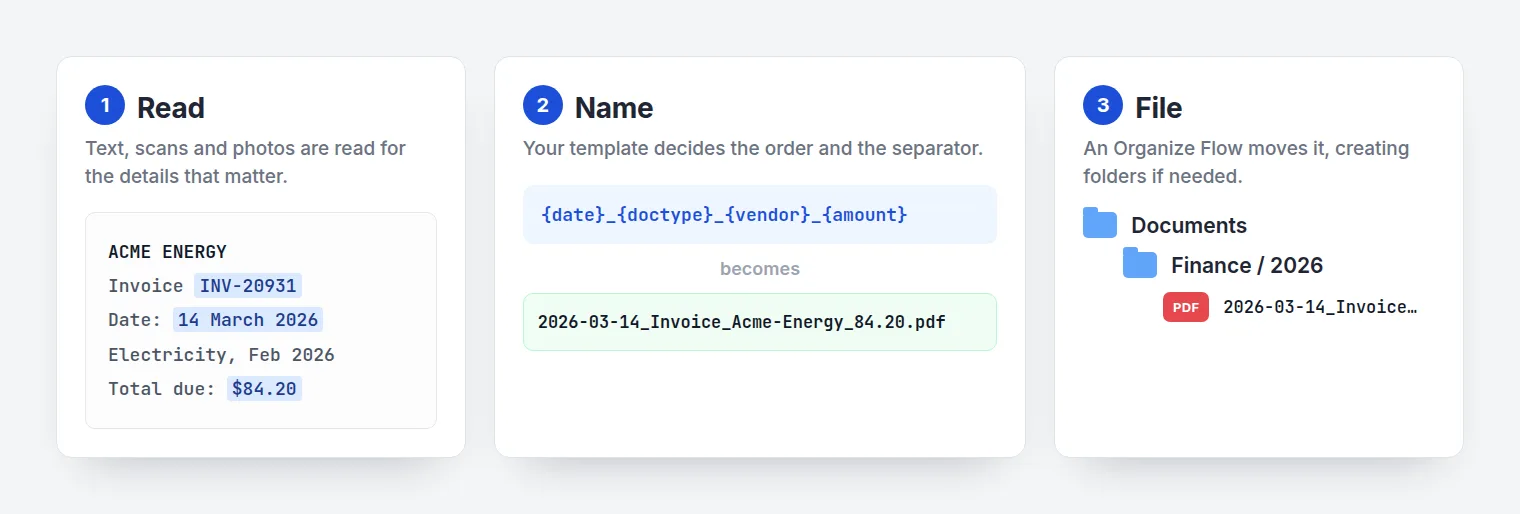
- It reads the content. Text from PDFs, Word, Excel and PowerPoint. OCR and AI vision for scans, photos and screenshots. Capture date and place for photos. Short clips for audio and video.
- It picks the details. In Smart mode the AI writes a short descriptive name. In template mode it pulls exact fields, such as date, vendor and amount.
- It builds the name. Your pattern, separator and letter case are applied. Dates and amounts keep their punctuation, so
84.20stays84.20. - You check, or it runs by itself. Dragged-in files open as a preview. Untick any file you want left alone, then click Rename. Watch folders and inboxes rename new files automatically. Every change is listed in History, where you can undo it.
- It files the result. Organize Flow moves or copies the file into a folder, creating it if needed. On a Mac it can also add Finder tags and color labels.
The file's contents never change. Only its name and its folder do.
Before and after
| Files | Before | After |
|---|---|---|
| Invoices | invoice (3).pdf | 2026-03-14_Invoice_Acme-Energy_84.20.pdf |
| Receipts | scan0042.pdf | 2026-02-02_Receipt_Office-Depot_32.99.pdf |
| Photos | IMG_8831.jpg | 2025-08-19_Lisbon_Tram-28.jpg |
| Screenshots | Screenshot 2026-05-04 101233.png | 2026-05-04_Stripe-Dashboard_Failed-Payments.png |
| Recordings | Recording (12).m4a | 2026-04-11_Client-Call_Q2-Budget-Review.m4a |
Accountants and bookkeepers use the same setup across client folders. See AI File Renamer for Accountants.
What to look for in the best AI file organizer
"AI file organizer" covers very different things: cloud storage features, command-line scripts and desktop apps. Before you pick one, check these seven points.
| What to check | Why it matters | FilesDesk |
|---|---|---|
| Reads scans and photos, not just text | Most paperwork arrives as scans or phone photos | OCR and AI vision; on a Mac, scan text is read on the device |
| Works on your own folders | Cloud-only tools only organize what you upload to them | Desktop app for your local and synced folders |
| Preview and undo | You should see every name before it's applied | Preview, untick any file, one-click undo in History |
| Moves files, not just renames | Good names still need a home | Organize Flow, with starter flows for bills, receipts, contracts, photos |
| Runs on new files automatically | A one-off cleanup gets messy again in a month | Watch folders and Watch Inbox for email attachments |
| Private option | Client, medical and tax files may not be allowed in the cloud | Local AI with Ollama or LM Studio, or your own API key |
| Mac and Windows | Teams and households usually mix both | Windows 10 and 11, macOS 12 or later |
The automation point matters more than it looks. A one-off cleanup is satisfying, but without automation the mess is back within a month. In FilesDesk, watch folders and inboxes feed new files through the same rename and filing steps:
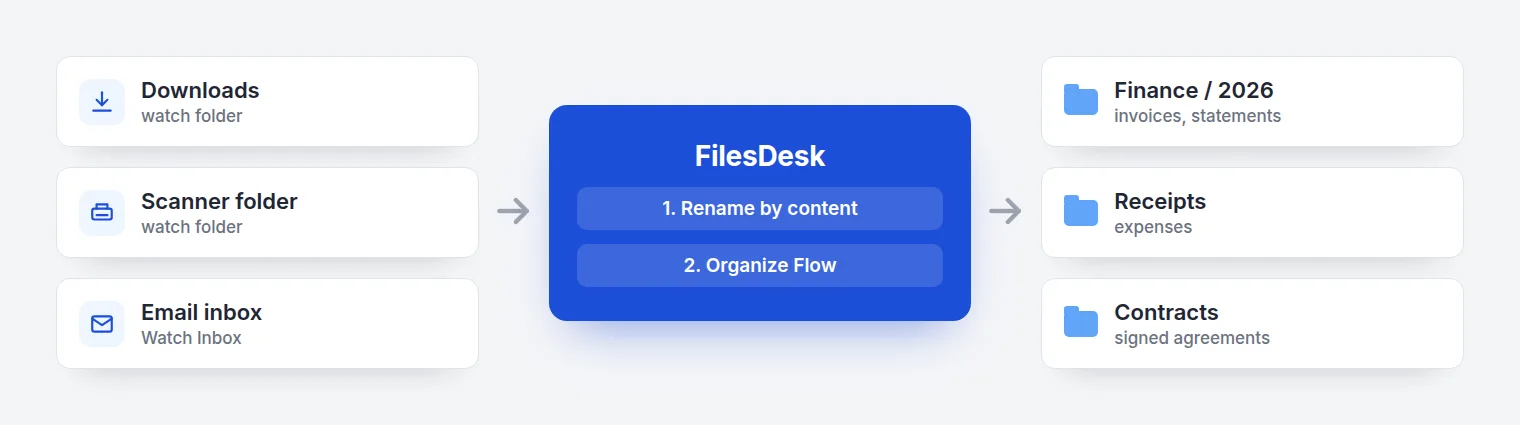
Coming from a rules-only tool like Hazel? FilesDesk vs Hazel covers the differences. For a wider list of tools, see Best AI File Renamer Tools in 2026.
What's new in FilesDesk (updated November 2026)
| Version | Released | What changed |
|---|---|---|
| 1.0.35 | Nov 3, 2026 | Monthly and yearly plans now shown simply as "Subscription" |
| 1.0.34 | Oct 26, 2026 | Templates built with AI, control from AI assistants, Stats tab, five new templates |
| 1.0.29 | Sep 21, 2026 | Watch Inbox for email attachments, Activity Log, Run on Startup, HEIC photos |
Version numbers are for the Mac app. The Windows app ships through the Microsoft Store with its own numbering.
Build an AI file renamer template by describing your files
In 1.0.34 you answer one question about the files you want to name, and FilesDesk AI builds the template for you, with starter ideas, sample files and a live example name. You can test it on real files before saving, and nothing is renamed during the test. Five built-in templates were added: Client Files, Purchase Orders & Quotes, Letters & Correspondence, Invoice Documents, and Medical & Insurance.
Organize files from Claude, ChatGPT or Cursor
Settings → AI Assistants turns on a local connection (over MCP, the Model Context Protocol). Claude Desktop, Claude Code, ChatGPT / Codex, Cursor, VS Code, LM Studio and Ollama can then manage your templates and watch folders. You can ask things like "Watch my Downloads folder and rename new files." The connection stays on your computer and is protected by an access key.
Stats and smaller improvements
- A Stats tab shows files renamed, time saved, success rate and a breakdown by file type.
- Scanned PDFs: the first and last pages are read together, for better names on multi-page scans.
- New Capitalize Each Word option, and better handling of long documents in Ollama.
Email attachments, filed automatically
Watch Inbox (1.0.29) connects to Gmail, iCloud Mail, Yahoo, Fastmail, Proton Mail or any IMAP mailbox with an app password. Matching PDFs and photos are saved, renamed and filed, and nothing in your mailbox is moved or marked as read. Microsoft 365 support is on the roadmap. Full walkthrough: How to Automatically Save Email Attachments to a Folder.
Is an AI file organizer safe? Privacy options
It depends on where the AI runs. FilesDesk lets you choose:
| Option | Where files are read | Best for |
|---|---|---|
| FilesDesk AI (Subscription) | Sent for processing, deleted straight after, not stored | No setup, fastest start |
| Your own key: OpenAI, Claude, Gemini, OpenRouter (Self-Managed) | Only your chosen provider, never FilesDesk's servers | Teams with an existing AI account |
| Local AI: Ollama, LM Studio (Self-Managed) | Your computer only | Client, legal, medical and tax files |
API keys are kept in the macOS Keychain or Windows Credential Manager. For offline use, pick a model that can read images. See Choosing the Right Ollama Model for AI File Renaming.
How much does an AI file organizer cost?
FilesDesk has a free trial with 15 files and no card. After that:
| Plan | Price | Includes |
|---|---|---|
| Basic | $8 a month | 500 files a month with FilesDesk AI |
| Pro | $20 a month | 2,000 files a month with FilesDesk AI |
| Self-Managed | $40 once | Your own AI key or local AI, no monthly limit |
Yearly billing gets two months free. Failed files aren't charged. Current details are on the pricing page.
How to start organizing files with AI in five minutes
- Download FilesDesk for Mac (macOS 12 or later), or get it from the Microsoft Store on Windows 10 or 11.
- Start the free trial. No card needed.
- Drag a messy folder into Manual, choose Smart or a template, and look over the suggested names.
- Happy with them? Add the folder on the Automatic tab as a watch folder, and add an Organize Flow to move files where they belong.
- Optional: turn on AI Assistants in Settings and connect Claude, ChatGPT or Cursor.
Try FilesDesk: the AI file organizer and renamer for Mac & Windows
Free to start. No credit card required.
Download FilesDeskFrequently asked questions
What is the best AI file organizer?
The best AI file organizer reads file contents, including scans, shows a preview with undo, moves files as well as renaming them, and runs automatically on folders and email. It should also offer local AI for private files. FilesDesk does all of this on Mac and Windows.
Is there a free AI file organizer?
Yes. FilesDesk has a free trial with 15 files and no card. Open-source scripts exist too, but most need command-line setup.
Can ChatGPT or Claude organize my files?
Not on their own, because they can't reach the files on your computer. With AI Assistants turned on in FilesDesk, Claude, ChatGPT / Codex or Cursor can create naming templates and set up watch folders, and FilesDesk does the renaming.
Can AI rename files based on their content?
Yes. An AI file renamer reads the text, scans, images or audio inside a file and writes a name from it, such as 2026-03-14_Invoice_Acme-Energy_84.20.pdf.
Does an AI file organizer work offline?
Some do. FilesDesk works fully offline with Ollama or LM Studio, which come with the one-time Self-Managed license.
Is there an AI file organizer for Windows?
Yes. FilesDesk runs on Windows 10 and 11 through the Microsoft Store, and on macOS 12 or later. See also Best AI File Renamer for Windows.
Can I undo an AI rename?
Yes. Every rename and move is listed in History and can be undone in one click.